FAQs
FAQ Subject
Please refer to the application guide, it can be obtained from ftp://ftp.planet.com.tw/FAQ/Network Security/FAQ-WSG500_1.pps
Firstly, please start up the IGT-90x/90xT Web User Interface and press Security feature link then create a new TCP/UDP Filter policy.

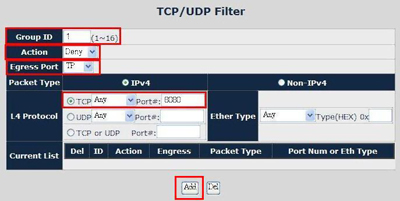
Next, if there is no any TCP/UDP policy of your IGT-90x/90xT so far, please fill out “1” to Group ID field and then configure as following one by one as the figure below: Action to Deny and Egress Port to TP then choose TCP to Any and fill out Port as 8080 at L4 Protocol field then press Add button.
1.) Please set the WNRT-625v3 Operation Mode Configuration as the WISP Mode.

2.) Please set the type of WAN Port.

3.) Set the Wireless Setting / Site Survey function.

Choose the right SSID and security mode to Add the Profile.
Please check the Administrator function / status.

The suggested number of wireless clients is 15 maximum. Moreover, it is not advised to use WPG-110 as AP mode during projection.
Please refer to the MAP-3120 application guide, it can be obtained from ftp://ftp.planet.com.tw/WirelessLAN/MAP-3120/MAP3K_AppGuide1.pps
Receiver not receiving the right optical signal; check if the link loss rate is normal. The rolling diameter is too short(less than 20CM); impurities on ceramic interface (gently clean it with alcoholic cotton)..
All End-Span / Mid-Span PoE devices could work with WNAP-3000PE PoE Access Point. Be reminded, if your POE injector is Mid-span, or your POE PSE switch is Fast Ethernet device, WNAP-3000PE will only connect to the network in either 10Mbps or 100Mbps. Only use Gigabit POE End-Span Switch, such as PLANET SGSW-24040P, can the WNAP-3000PE connects in truly 1000Mbps bandwidth.




