FAQs
FAQ Subject
1.) Please set the WNRT-625v3 Operation Mode Configuration as the WISP Mode.

2.) Please set the type of WAN Port.

3.) Set the Wireless Setting / Site Survey function.

Choose the right SSID and security mode to Add the Profile.
Please check the Administrator function / status.

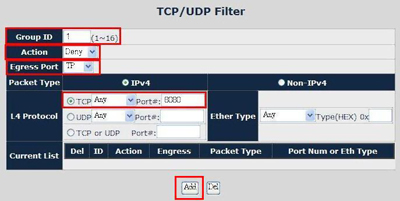
Firstly, please start up the IGT-90x/90xT Web User Interface and press Security feature link then create a new TCP/UDP Filter policy.

Next, if there is no any TCP/UDP policy of your IGT-90x/90xT so far, please fill out “1” to Group ID field and then configure as following one by one as the figure below: Action to Deny and Egress Port to TP then choose TCP to Any and fill out Port as 8080 at L4 Protocol field then press Add button.
Check is data protocol is right (if using 232 transmitting 485, etc.), if the transmitting direction is right (forward、backward or bidirectional), if connecting right (data is positive or negative, transmitting or receiving), if the data input is right.
WAP-8000 Country Code And RF Power Settings
The country code can be selected here to fit the local restriction law. Changing country code will cause the available channel changes.
**Be notice, when select:
ETSI (1), the RF output power supports options: Full, 1/2, 1/4, 1/8, 1/16
ETSI (2), the RF output power supports options: Full, 1/2, 1/4

WILDCARD :
11b/g: 1.2.3.4.5.6.7.8.9.10.11
11a: 36.40.42.44.48.50.52.56.58.60.64.149
152.153.157.160.161.165
China
11b/g: 1.2.3.4.5.6.7.8.9.10.11.12.13
11a: 149. 153.157.161.165
ETSI(2) :
11b/g: 1.2.3.4.5.6.7.8.9.10.11.12.13
11a: 36.40.44.48.52.56.60.64
ETSI(1) :
11b/g: 1.2.3.4.5.6.7.8.9.10.11.12.13
11a: 36.40.44.48.52.56.60.64.100.104.108.
112.116.120.124.128.132.136.140
Japan:
11b/g: 1.2.3.4.5.6.7.8.9.10.11.12.13.14
11a: 34.38.42.46
US:
11b/g: 1.2.3.4.5.6.7.8.9.10.11
11a: 36.40.42.44.48.50.52.56.58.60.64.149
152.153.157.160.161.165
Please refer to the WAP-8000 TX Power dBm level adjust WEB UI setting:
In the wildcard code , the WAP-8000 default is full level (Max up to 26 dBm /400mWatt).
Please refer to the wireless setting after choosing the country doe ( ETSI(2)/ETSI(1) ).
Equivalent isotropically radiated power (EIRP) in the EU is limited to 20 dBm (100 mW).
Remember when calculating your total output that the FCC only allows 36dBm EIRP (4 watts)!
Please set the WAP-8000 Transmit Power as the 1/4 power level.

ETSI (1)

ETSI (2)
dBm to Watt Conversion Table
dBm | Watts |
| dBm | Watts |
0 | 1.0 mW |
| 16 | 40 mW |
1 | 1.3 mW |
| 17 | 50 mW |
2 | 1.6 mW |
| 18 | 63 mW |
3 | 2.0 mW |
| 19 | 79 mW |
4 | 2.5 mW |
| 20 | 100 mW |
5 | 3.2 mW |
| 21 | 126 mW |
6 | 4 mW |
| 22 | 158 mW |
7 | 5 mW |
| 23 | 200 mW |
8 | 6 mW |
| 24 | 250 mW |
9 | 8 mW |
| 25 | 316 mW |
10 | 10 mW |
| 26 | 398 mW |
11 | 13 mW |
|
|
|
12 | 16 mW |
|
|
|
13 | 20 mW |
|
|
|
14 | 25 mW |
|
|
|
15 | 32 mW |
|
|
|
Please refer to the application guide, it can be obtained from ftp://ftp.planet.com.tw/FAQ/Network Security/FAQ-WSG500_1.pps
There are Authorize.Net, PayPal, SecurePay, WorldPay, 4 kinds of external payment gateway supported by WSG-500.
The WNAP-C3220 takes the 12V DC power for the first priority. If the AC Power adapter stops supporting power or cannot support voltages above 9V DC, the 802.3af PoE power takes over immediately.




