FAQs
FAQ Subject
You have to define the so-called ”Button Key”. This can be done in the Remote Console settings.
Make sure your browser cache settings are feasible. Make sure the cache settings are not set to the setting like ”never check for newer pages”. Otherwise, IKVM-8020 pages may be loaded from your browser cache and not from the unit, which is the cause of the result.
This is possibly a Windows XP problem. Try not to move the mouse while XP goes in standby mode.
If an ’internal error’ occurs while uploading the signed certificate, either change the extension of the file to .txt or add a file helper using the Internet Explorer preferences for this type of file. Make sure that the encoding is plain text and the checkbox “use for outgoing” is checked. Another possibility is to use a Mozilla based browser.
Please check if you have enabled an option like “Automatically move mouse pointer to the default button of dialog boxes” in the mouse settings of the operating system. This option needs to be disabled.
Please refer to the following steps to make an FTP server.
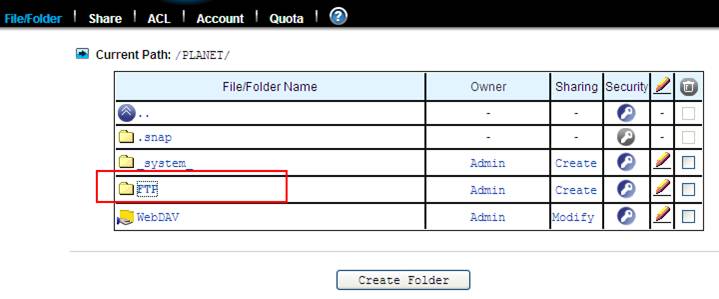
Step 1. Create a name at “File/Folder”.
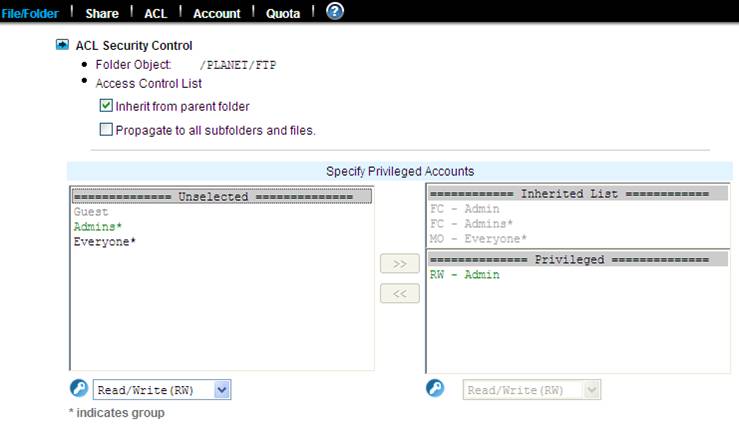
Step 2. Set the account
Step 3. Go to Share via Protocols and check all.

Step 4. Go to Share Permissions and check all.

Step 5. Enable FTP data access and Allow file upload and download.

Please refer to the following steps to update and download file via WebDAV.
Step 1. Enable Web data access (Allow file upload and download) and WebDAV

Step 2. Create a folder at “File/Folder”.

Step 3. Go to Share Permissions and check all.

Step 4. Go to WebDAV

Step 5. Upload / Download file




