FAQs
FAQ Subject
Please refer to the following steps to reset the password.
Step 1. Adjust DIP switch to ON and press Reset button for about 1~2 seconds The console LED would blink and status LCD would scan the IPM.


Step 2. Adjust Dip Switch to OFF and press Reset button for about 1~2 seconds The console LED would blink.
Regarding this detail descriptions, it is suggested to download the product and read the documentation for more understandings, thank you.
 FAQ-IPM-1200x-Series_How to upgrade the firmware via upgrade tool.pdf
Please refer to the following steps to set the Power Schedule On/Off.
Step 1. Go to “Time Setting” to confirm a time in the Time Sync Frequency.

Step 2. Go to “Schedule On/Off” to set the power to Off.

Step 3. Go to “Schedule On/Off” to set the power to On.

Step 4. Save the setting.

Step 5. Done
Please refer to the following steps to install the NAS-7103 / NAS-7202 with iTunes.
Step 1. Enable iTunes Server and Save the setting.

Step 2. Enter the IP of NAS-7103/7202 in the address bar.

Step 3. Map the Network Drive.

Step 4. Add an MP3 of NAS-7103/7202 at iTunes.

1) Play the MP3 at iTunes.

2) The version of iTunes is 10.7.0.21

Regarding this detail descriptions, it is suggested to download the product and read the documentation for more understandings, thank you.
Please refer to the following steps to update and download file via WebDAV.
Step 1. Enable Web data access (Allow file upload and download) and WebDAV

Step 2. Create a folder at “File/Folder”.

Step 3. Go to Share Permissions and check all.

Step 4. Go to WebDAV

Step 5. Upload / Download file

Please refer to the following steps to make an FTP server.
Step 1. Create a name at “File/Folder”.
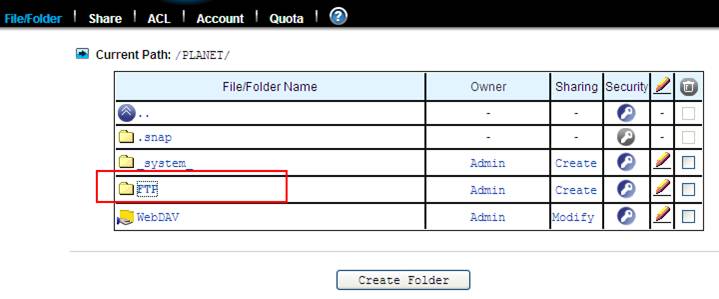
Step 2. Set the account
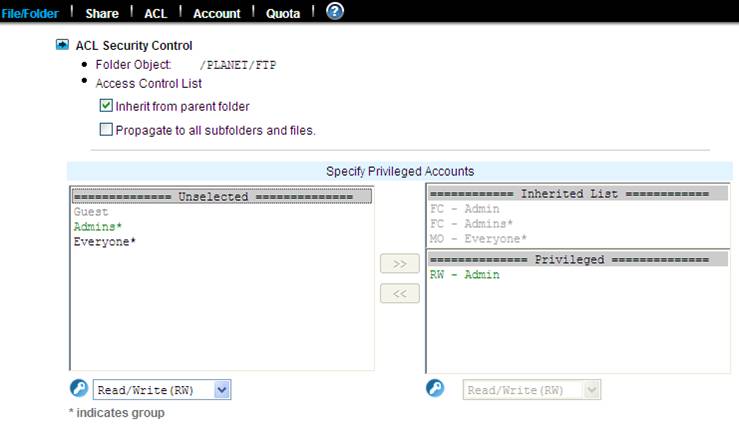
Step 3. Go to Share via Protocols and check all.

Step 4. Go to Share Permissions and check all.

Step 5. Enable FTP data access and Allow file upload and download.




