FAQs
FAQ Subject
WSG-500 supports monitoring IP for 40 network devices, e.g. WSG-ACG5 Thermal Printer, IP Camera, AP, Printer Server. This function is for checking if all services are activating or not.

Configure the internal IP of those devices in the Monitor IP Address List, and click Create button one by one. Then click Apply and Monitor Now.

The green signal indicates the device works normally.
The red signal indicates there is some problem with the connection or the device.

For Outdoor AP installation, PLANET is with a set of cable for the wiring.
The WAP-6000 or WAP-7000 attaches one cable to one set of antenna, MAP-2000/2000R attaches two cables for two RF connectors.
And the connection diagram can be as below.

Example:
Figure1:

Figure 2: extend cable

Add booster (for example: WBT-1000, figure is similar to the application as above.):

WAP-8000 Country Code And RF Power Settings
The country code can be selected here to fit the local restriction law. Changing country code will cause the available channel changes.
**Be notice, when select:
ETSI (1), the RF output power supports options: Full, 1/2, 1/4, 1/8, 1/16
ETSI (2), the RF output power supports options: Full, 1/2, 1/4

WILDCARD :
11b/g: 1.2.3.4.5.6.7.8.9.10.11
11a: 36.40.42.44.48.50.52.56.58.60.64.149
152.153.157.160.161.165
China
11b/g: 1.2.3.4.5.6.7.8.9.10.11.12.13
11a: 149. 153.157.161.165
ETSI(2) :
11b/g: 1.2.3.4.5.6.7.8.9.10.11.12.13
11a: 36.40.44.48.52.56.60.64
ETSI(1) :
11b/g: 1.2.3.4.5.6.7.8.9.10.11.12.13
11a: 36.40.44.48.52.56.60.64.100.104.108.
112.116.120.124.128.132.136.140
Japan:
11b/g: 1.2.3.4.5.6.7.8.9.10.11.12.13.14
11a: 34.38.42.46
US:
11b/g: 1.2.3.4.5.6.7.8.9.10.11
11a: 36.40.42.44.48.50.52.56.58.60.64.149
152.153.157.160.161.165
Please refer to the WAP-8000 TX Power dBm level adjust WEB UI setting:
In the wildcard code , the WAP-8000 default is full level (Max up to 26 dBm /400mWatt).
Please refer to the wireless setting after choosing the country doe ( ETSI(2)/ETSI(1) ).
Equivalent isotropically radiated power (EIRP) in the EU is limited to 20 dBm (100 mW).
Remember when calculating your total output that the FCC only allows 36dBm EIRP (4 watts)!
Please set the WAP-8000 Transmit Power as the 1/4 power level.

ETSI (1)

ETSI (2)
dBm to Watt Conversion Table
dBm | Watts |
| dBm | Watts |
0 | 1.0 mW |
| 16 | 40 mW |
1 | 1.3 mW |
| 17 | 50 mW |
2 | 1.6 mW |
| 18 | 63 mW |
3 | 2.0 mW |
| 19 | 79 mW |
4 | 2.5 mW |
| 20 | 100 mW |
5 | 3.2 mW |
| 21 | 126 mW |
6 | 4 mW |
| 22 | 158 mW |
7 | 5 mW |
| 23 | 200 mW |
8 | 6 mW |
| 24 | 250 mW |
9 | 8 mW |
| 25 | 316 mW |
10 | 10 mW |
| 26 | 398 mW |
11 | 13 mW |
|
|
|
12 | 16 mW |
|
|
|
13 | 20 mW |
|
|
|
14 | 25 mW |
|
|
|
15 | 32 mW |
|
|
|
Yes, our wireless products support those protocols. Basically, the wireless card and access point works on physical layer and MAC layer. All three protocols can work transparently on our wireless products.
To factory reset the MAP-2100, please follow the steps bellows.
Step 1: Find the Restore Default DIP switch.
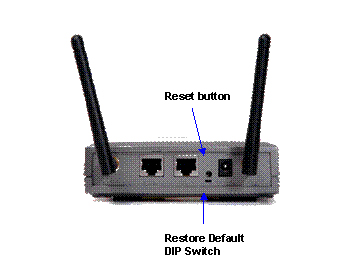
There are two switches on the real panel of MAP-2100.
One is reset push button and the other is slide switch.
The bottom one is the Restore Default DIP switch.
Step 2: Turn the Restore Default DIP switch to left.
By default, this DIP switch should stay at right for system normal operation. And turn to left will use default setting to boot up.

Step 3: Power on the MAP-2100 and check the web page
Power on the MAP-2100 and after the POST (Power On Selft Test) the system will use the default setting.
That is:
WAN: DHCP Client
LAN : DHCP Server (IP Range: 172.x.y.z; where x and y will follow the WAN MAC address)
You can either through WAN port or LAN port to make the management right away..
Once start up the Web page, you will be prompt for the Red Warning message on the Web page.

Step 4: Force Reset
From Web page, click on System Management, and then select Configuration.
And click on the “Factory Default” button.
It will prompt for Reboot.
Step 5: Power off the MAP-2100 and set back the DIP switch.
After power off the MAP-2100, please set the DIP switch back to its normal operation position. That is, turn the DIP to right.

Step 6: Power on the MAP-2100 and the MAP-2100 will get back to default setting.
Note:
1. Without setting back the DIP switch to right position, the Warning
message on the Web page will not be removed. At this mode, all the
settings will be lost the next time boot up.
2. It is also suggested that, memorize the system IP address, password
and all the necessary information like SSID etc. and keep it in a safe
place for system maintain purpose.
The case is made of one unit. It doesn't need rubber.

For the power supply of WNAP-3000PE, you could use either IEEE 802.3af PSE device or 12VDC Adapter. Please do not use 12V adapter and PSE devices at the same time. It may damage the 11n AP devices.




